Garbage in. A decision out.
Any Excel, however messy. MapVisualizer reads it, repairs what it can, identifies the sites it can't, routes and prices the whole network — and hands your data back better than it arrived. Mapped, routed and priced the same afternoon. Not week six.
No preparation. No template. No data project.
- Understand
- Your actual data on the map — and what you never knew about it.
- Quantify
- Every flow costed against real tariffs. From opinion to number.
- Optimize
- Options that compete on savings you can actually realize.
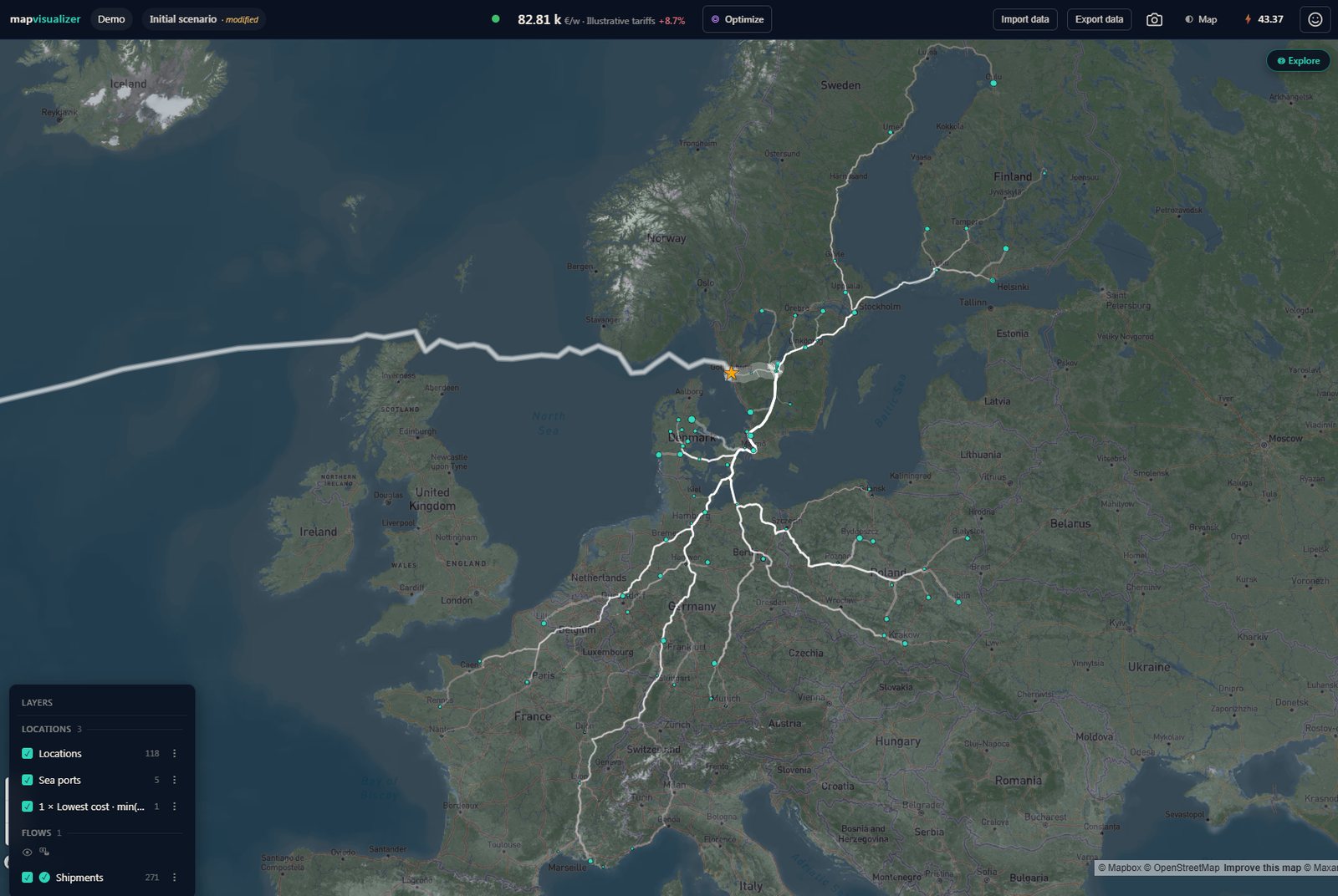
A network imported from one spreadsheet — mapped, routed through ports and priced against the built-in European benchmark. No tariffs of your own required.
An answer you cannot act on is worth nothing.
Optimization isn't the hard part of the project.
Optimization is an art — it takes knowledge and experience to do right. But in a project it is the part a tool solves for you. What tools normally don't solve is what sits on either side of it: getting reality into a model, and getting a result back into reality.
Data readiness getting reality into a model
Every table an optimizer needs — sites, products, demand, lanes, rates, capacities, policies — filled and joined by exact keys, without a single mistake. The suites ship with an ETL tool for exactly this reason.
It takes developer skills, database skills, logistics knowledge and command of two tools. So it usually ends with consultants doing the first analysis — and maybe the next few as well.
Optimization the art
Knowledge and experience to do right — and, in a project, the one part a tool does for you. Solved, in that sense, for decades.
Implementation getting a result back into reality
The old truth: strategic decisions on strategic-level data, tactical on tactical, and only operations sees every detail.
After hundreds of projects, that truth is wrong. A result built on aggregated data is academic — and the savings it identified never quite arrive.
What never gets analyzed never gets optimized.
There is money parked in most networks.
Logistics is almost the definition of change. Volumes move, contracts renew, companies merge — and the structure stays.
As designed
As it runs today
- Co-loading that never happens.
- Flows that cross each other.
- Locations that were right five years ago.
The savings are almost always there. The problem is that a savings project is too expensive, too slow and too heavy to run often — the humps stand in the way, so the network gets looked at once every few years and drifts in between.
When was your network last analyzed end to end?
There had to be a better way.
Twelve years of evaluating, buying and using the most powerful tools in the world — at a cost in the millions per year and team — and the same pattern every time: a huge hump to reach a result, a result too generic to use, and an enormous effort from finding to implementation. MapVisualizer was built around four things those tools never delivered.
Start with the data you already have.
No further preparation. The file you have is the file it takes — the tool starts where the other process ends.
→ How it worksUnderstand it — don't just trust it.
No "trust me" answers from software. See it visually, and drill from any number to the rows behind it.
→ The ladderResults as instructions you can act on.
The tool writes the plan, at the resolution operations run on — so the savings that were identified are the savings that arrive.
→ Actions you can bankPower that wasn't buildable a few years ago.
AI in the foundation rather than bolted on, and today's compute — which is what lets it keep every shipment instead of averaging them.
→ Why averages lieStart with the data you have.
No minimum threshold. Your data decides how far you get, not whether you get started.
Import and interpret
Load the Excel you have, straight off. The AI reads about thirty sample rows and writes a recipe — then the recipe runs deterministically over the whole file, 500 rows or 500,000.
Elevate beyond the original
Data Health finds the errors and guides the fix. Location Doctor identifies sites from their context and the network they belong to. Your data leaves better than it arrived.
Route and price
Multimodal routing adds ports and sea legs automatically, then prices every leg against real tariffs or the built-in European benchmark.
Mapped, routed, priced
Dated shipment data, ready to analyse — and a well-structured export if you want to stop right here.
Your baseline builds itself.
Mapped, routed and priced against a built-in European road benchmark — before a single tariff of your own.
The baseline is where network projects usually die: it is where everyone starts arguing about assumptions. Here it is the starting point, not the project.
From the file drop to a priced network, as it happens. Same afternoon. Not week six.
See it. Cost it. Then improve it.
Three rungs, in that order — because an optimization you don't understand is one you can't defend.
See it. Explore it. Understand it.
Your actual data, visualised — the whole network in your own look, executive-ready without extra work. Then the part that surprises people: every figure on the page drills down to the rows behind it, so a pattern you spot is one you can check.
- Sankey flows
- Shipment sizes
- Frequency
- A typical week
- Highest-impact ranking
- Filter & drill-down
You learn things about your own network in the first hour.
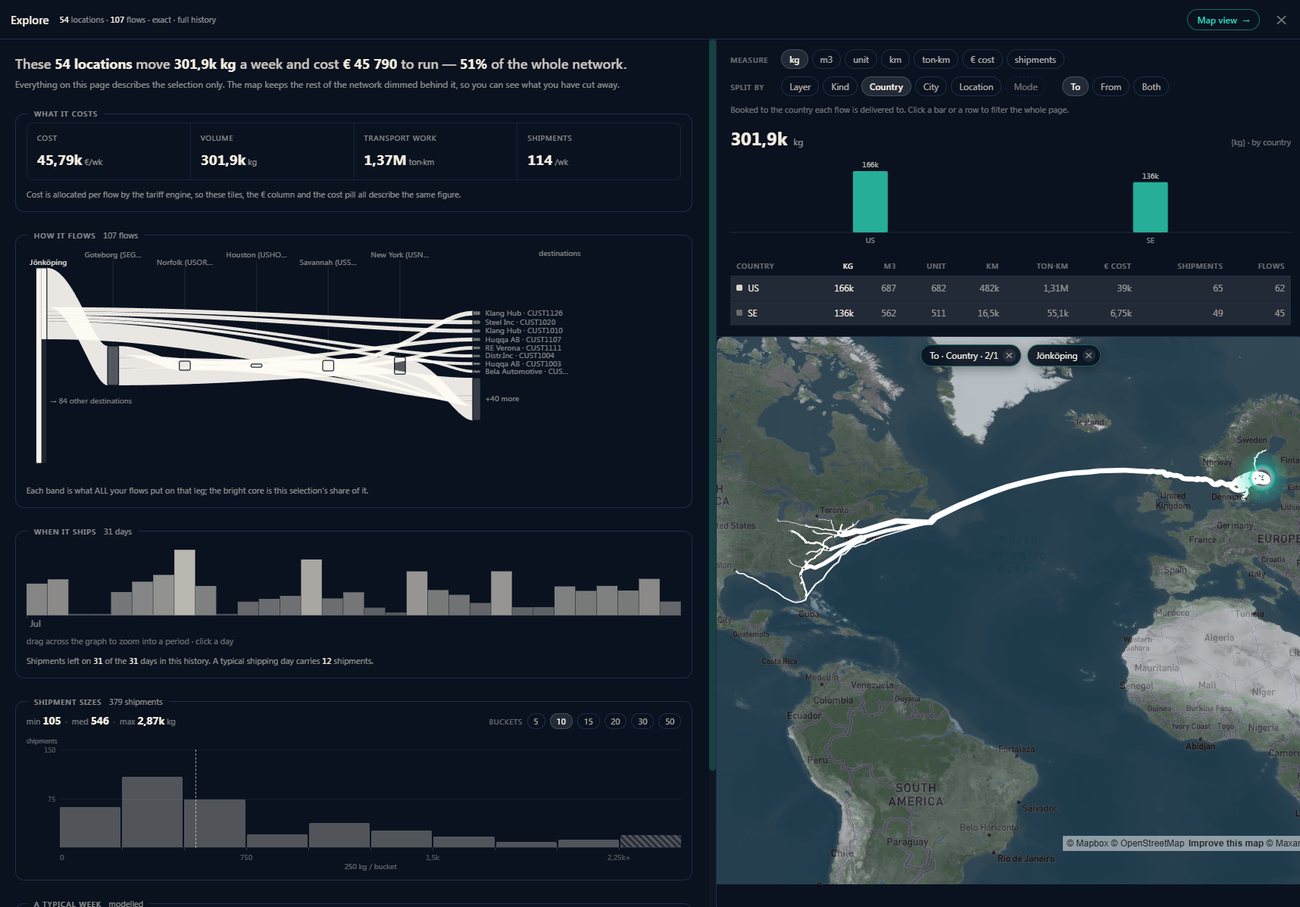
Explore · every figure on the page describes the selection only; the map keeps the rest of the network dimmed behind it.
Quantify it. Modify it. Compare it.
Cost, volume and distance — per flow. What-if scenarios in minutes, with a breakdown that explains why one scenario beats another, not just that it does.
- Your tariffs
- Built-in benchmark
- Real road distances
- Truck tours
- Scenario difference
From opinion to number.
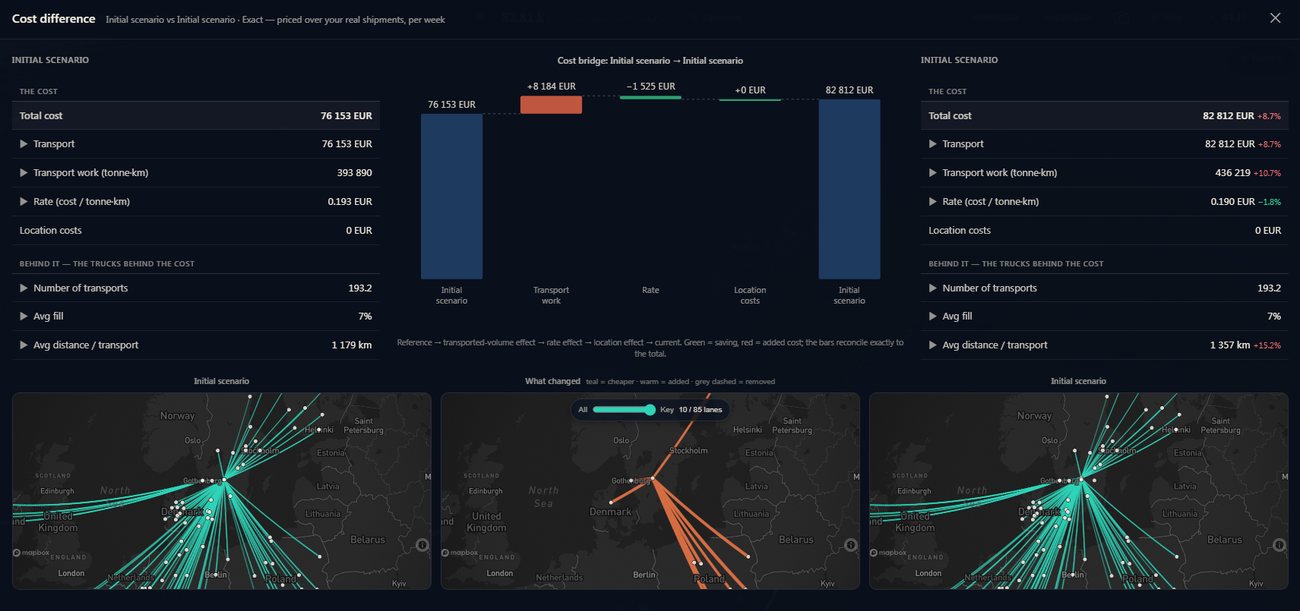
The bridge reconciles exactly: transport-work effect → rate effect → location effect → the new total. Every step is clickable down to the shipments behind it.
Optimize it — and see why.
Greenfield hubs on their best locations. A cost landscape that shows what moving a site is worth, zone by zone. Route-network optimization that finds co-loading across flows nobody paired by hand.
- Greenfield placement
- Cost landscape
- Route via hubs
- Co-loading
See the optimum. Don't just trust it.
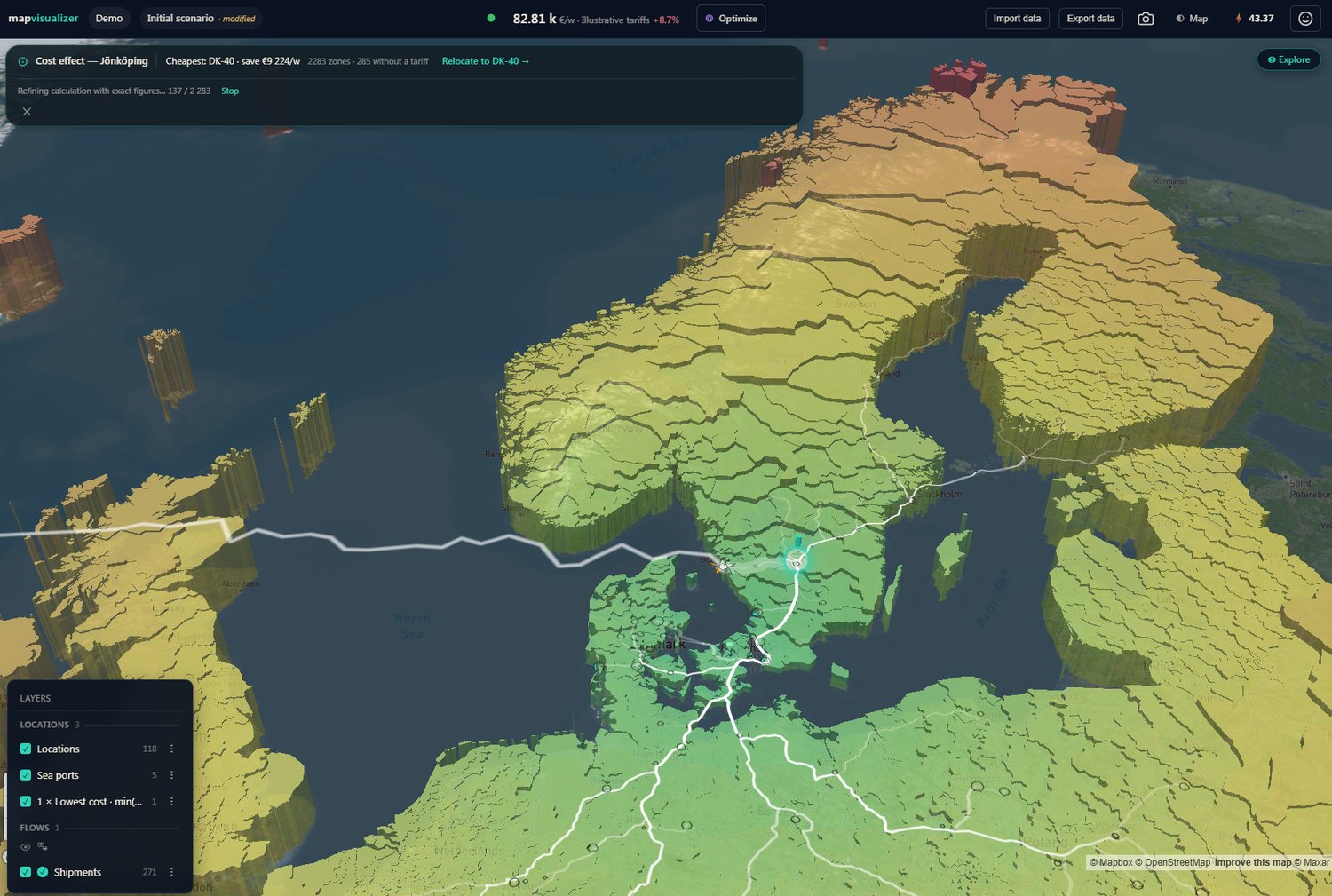
The shape of the landscape is the explanation — green is cheaper, red is worse, and the gradient tells you how much a decision is really worth. Illustrative demo network.
Averages create savings that don't exist.
Freight pricing is nonlinear — FTL breaks, minimum charges, tapering rates. Averaging is linear. Run one before the other and the answer is wrong by construction, in both directions. This is hump two, in numbers.
The freight never meets.
A reaches the crossdock in week 1, B in week 2. There is never anything to share with, so the long leg runs twice, half full.
Scroll to run the next state · click a card to go back
MapVisualizer keeps every shipment.
Because the model never averages at the entrance, it can tell a real opportunity from a phantom at the exit — and it can tell you how often the opportunity recurs. An opportunity seen in 34 of 52 weeks is structure. Seen once, it is luck.
Aggregation was a necessity in 1998. In 2026 it is a choice.
Let the options compete.
Strategic, tactical and near-operational actions in one evaluation — scored on realizable savings against actual shipments, not averages.
| Design | Period cost | Δ | What it takes |
|---|---|---|---|
| Alonereference · nothing shared | € 275 693 | +26% | — |
| Todaybase · as it runs now | € 218 851 | base | — |
| Direct, consolidatedtactical | € 188 968 | −14% | scheduling · weeks |
| Milk runnear-operational · lowest bookable | € 175 822 | −20% | dispatch change · weeks |
| Via a hubstrategic · standing design | € 323 468 | +48% | capex · years |
Priced through your own cost model over the same shipments · the crossdock is evaluated and rejected, not omitted · illustrative demo network
One question decides a network study: what do we actually do next? Elsewhere, strategic and tactical live in separate modules on separately aggregated data, so they can never be compared on a common basis. Here they run on the same shipment-level model. Apples to apples.
Of the 20%, fourteen points come from day shifts alone — before a single truck is shared.
A decision, not a report.
Actions you can bank.
Which destinations. Which days. Which mode. Which contract. The tool writes the plan — not one answer, but the best combination of answers.
North — from Hub A
Dispatch Tue 29 Apr · 14 shipments · shifts of +1 and −1 day · milk run € 3 932 against € 5 577 today.
South — new crossdock
Two areas, two different answers, one evaluation. Most studies end at "consolidate the south" and hand the how to operations. Here the tool writes the how into the result.
Not a region to consolidate — a plan for Monday morning.
Decisions you can defend.
A decision you understand is a decision that survives the meeting — in the steering group, to the CFO, a quarter later.
Network total
the number in the steering group
Areas to address
lane · volume · cost · distance
The shipments
dated · routed · priced
Every number drills down to the shipments behind it. The logic is visible; the breakdown is on screen. When someone asks why, the answer is already there.
Fewer iterations. Less consultant dependency. And your data stays in the EU by default — the AI reads a sample of rows under an explicit consent, and nothing else leaves.
Three tiers, one pipeline.
Each tier is the whole chain up to a point — and every tier ends in something you can take away.
Visualizer
- 01Import. Any Excel in. The AI reads the file and interprets it.
- 02Elevate. Data Health and Location Doctor take the data beyond the original.
- 03Visualize. The whole network in your own look, with intermodal routing.
- 04Measure. Kilometres driven, tonnes moved, transport work, centre of gravity.
Elevated data, the visualizations and the physical measures.
Calculator
- 05Cost. Priced against real tariffs — or the built-in European benchmark.
- 06Explore. Dig into flows, shipment sizes, frequency, the typical week.
The above, now costed — a defensible baseline and the scenarios around it.
Optimizer
- 07Optimize. Greenfield, cost landscape, route network — strategic and tactical competing.
- 08Plan for execution. Which destinations, which days, which mode, which contract.
The above, optimized — and a plan for Monday morning.
Share a full project with colleagues — or send it to your customer as a safe, explorable reader. And beyond the study: tariff comparison and cost simulation, in everyday use, long after the project ends.
One person. One afternoon.
Bring your messiest file.
See your network mapped, routed and priced in the first session — a file of yours, or a demo case.
No preparation. No template. No data project.
Messy data in. Mapped, routed, priced network out.
I realised the problem was never the optimization. A tool does that. The problem is the journey to get there — and the journey from the result back into reality.
"Every analyst knows shit in, shit out. I spent twelve years on the other side of that sentence — buying and using the most powerful tools in the world, and watching the answer never arrive."